
Agents and models
Herdloom has no model of its own. It drives the coding agent command line tools already installed on your Mac, using the logins and subscriptions you already pay for.
The six
Section titled “The six”Claude Code, Codex, Cursor, OpenCode, Antigravity and GitHub Copilot. Settings → Agents checks each one, together with git, your git identity and the GitHub command line tool, and says which are installed and which are signed in.
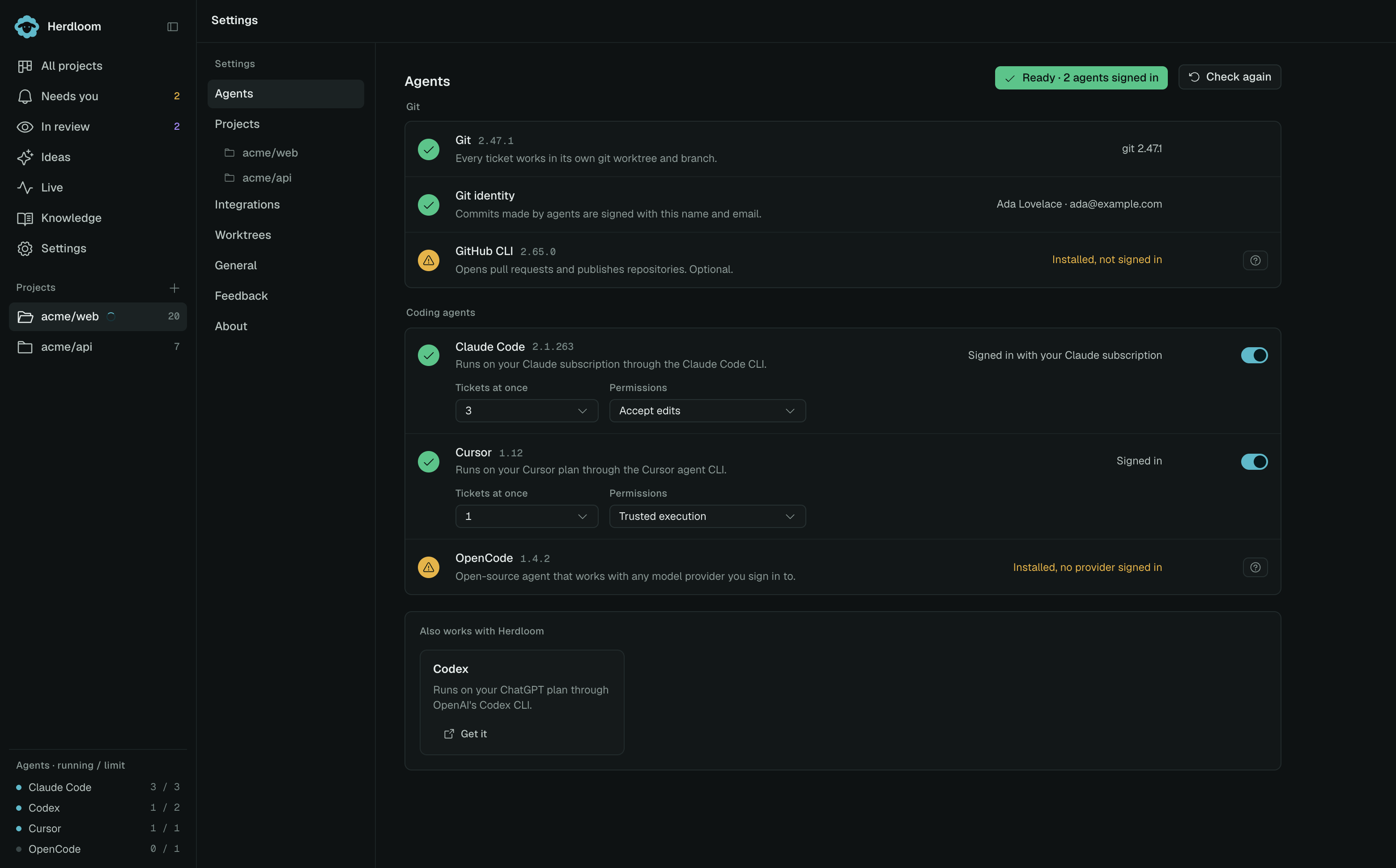
Agents that are not installed sit in a card of their own, one tile each, with what the tool runs on and a link to get it. Signing in happens in your own terminal, because each tool owns a browser login that does not survive being driven from another process. Herdloom shows the exact command and re-checks when you ask.
What the machine decides about an agent
Section titled “What the machine decides about an agent”Each signed-in agent’s row carries three things, and they apply everywhere, across every project.
On or off. A switched-off agent is not offered anywhere and does not appear in the sidebar.
Tickets at once. How many tickets that agent may work on simultaneously, counted across all projects. The agent list at the foot of the sidebar shows the running count against this limit.
Permissions. The permission mode the tool runs in, in that tool’s own vocabulary: Claude Code accepts edits, Codex takes workspace write, Cursor uses force. A read-only pass gets read, search and shell tools only, whatever the mode.
Which model does what
Section titled “Which model does what”Which agent and model does what is a project decision, not a machine one, and it is set per phase under Automation. Four rows pick a model, and each is independent.
| Row | What it runs |
|---|---|
| Backlog | Triages with — the read-only passes that rank and shape tickets |
| Planning | Plans with |
| Executing | Executes with |
| In review | Reviews with |
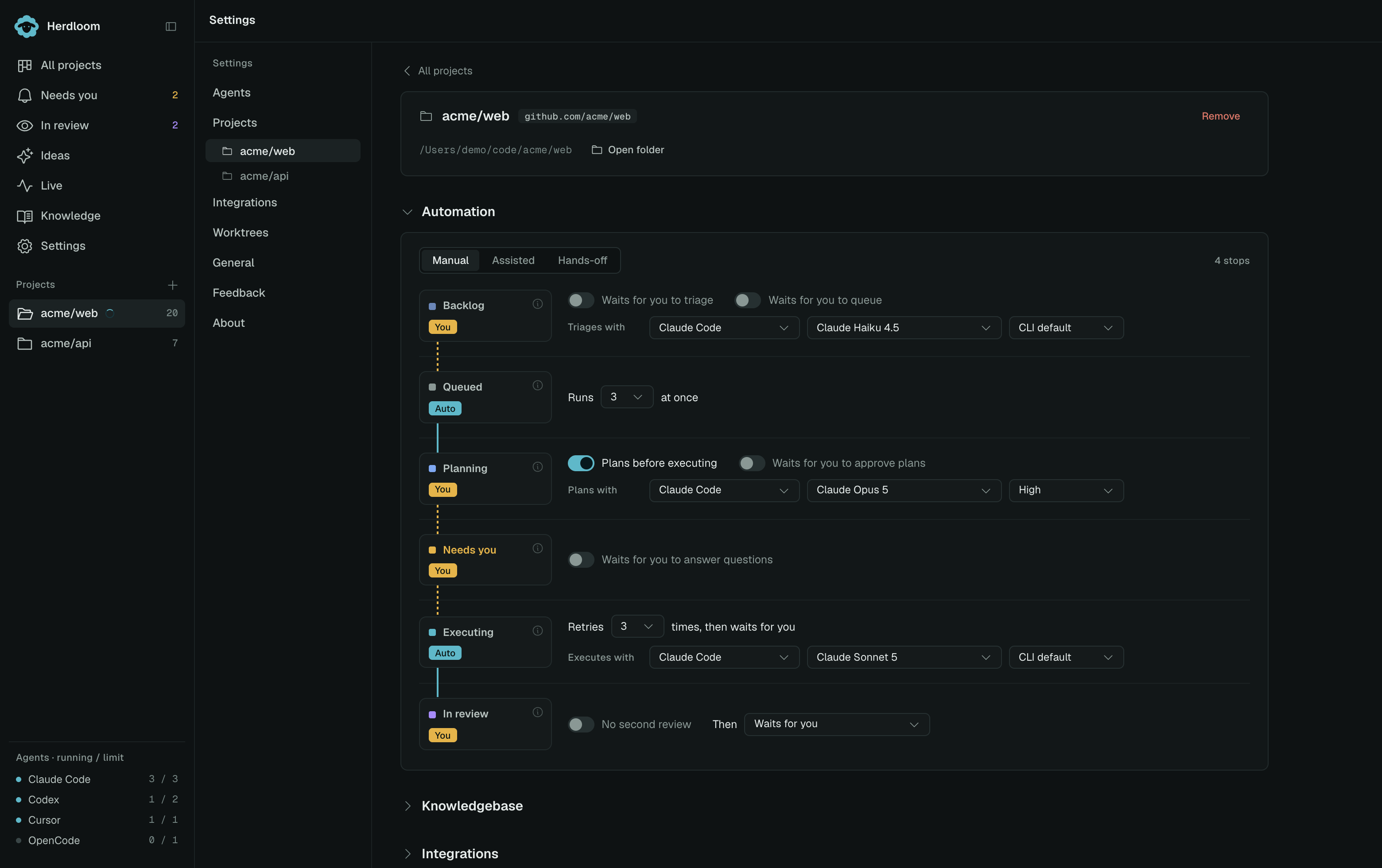
Each row takes an agent, a model and a reasoning effort. Effort is offered only for the tools that have it: Claude Code from low to max, Codex from minimal to extra high, Cursor from low to high. Needs you has no picker, because deciding a question runs no model; the ticket’s own agent carries on with a note.
A new project starts with an installed, enabled agent and uses the CLI’s own default model for planning and execution. Choose a different model on either row when you want one.
Models from your CLI
Section titled “Models from your CLI”Agent pickers only offer tools installed on your machine and enabled in Settings → Agents. Model choices come from that CLI using its current sign-in and configuration; Herdloom does not bundle a model catalog. When a new model appears in your CLI, use the refresh button beside any model picker to fetch it. Open pickers also recheck periodically and when you return to the app; successful results are cached for up to five minutes.
Keep the CLI itself up to date. If discovery fails, Herdloom explains the problem and keeps CLI default selectable. An existing saved model remains visible with Not currently listed until you choose another; it is never silently replaced. This label means the CLI did not advertise that saved identifier, not necessarily that the provider has retired it.
Two tools on one ticket
Section titled “Two tools on one ticket”The planner and the executor do not have to be the same tool. The usual split is a strong model for the plan and a cheaper one for the code.
This works because the plan travels as text. The approved plan goes into the execute prompt along with the spans of code the planner relied on, read fresh from the checkout at the moment execution starts, so an executor on another tool begins with what the planner saw instead of finding it again. Only when the two rows share a tool does execution also resume the planning session.
Any ticket can override either row before it runs.
Agents settings walks the page row by row. How much you approve covers the rest of the ladder.