
Triage the backlog
Triage is one read-only pass over a project’s backlog. An agent reads the tickets and the repository and comes back with an order to run them in, and with the reasons that order exists.
What a pass decides
Section titled “What a pass decides”For every ticket it places, triage records:
- A rank. Lower runs first. Ranks are fractional, so a ticket added later can slot between two that already have places.
- A size. S, M, L or XL, from what the work actually touches.
- Dependencies. The tickets whose code must be available before this one starts: completed in the same work item, or merged first if they belong to another branch.
- Conflicts. The tickets that touch the same files and must never run alongside it.
- Areas. The parts of the codebase it lands in.
- A one-line rationale for the placement.
- Flags, where something is wrong with the ticket itself.
There are three flags. Needs detail means the agent could not tell what to build. Too big means this is more than one run of work. Duplicate? links to the ticket that appears to ask for the same thing. A flagged ticket keeps its place in the order but stays out of the queue until you deal with it, and each flag carries the button that clears it.
Starting a pass
Section titled “Starting a pass”The Triage button sits in the Backlog column header.
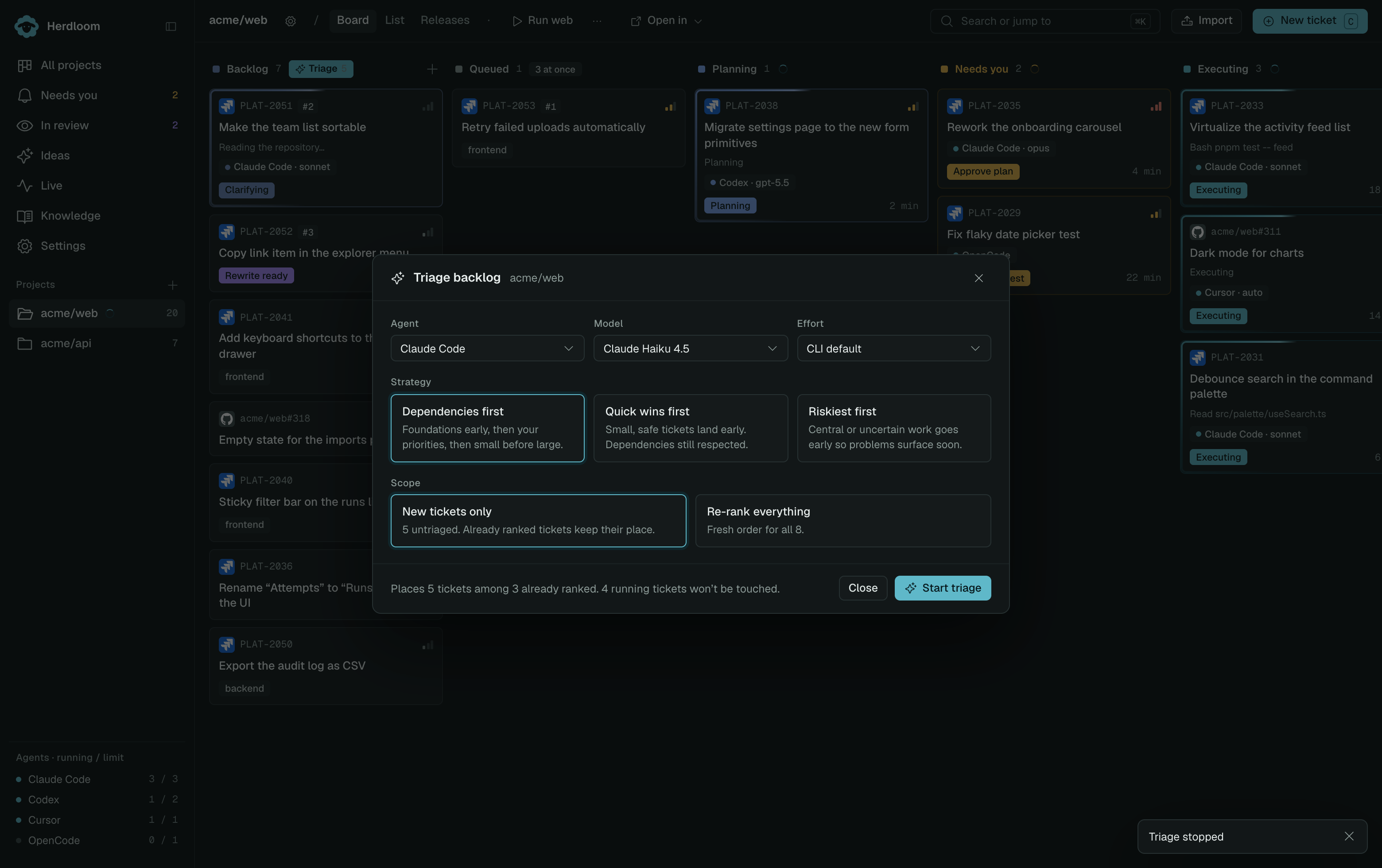
Pick the agent, model and reasoning effort for the pass, then a strategy:
- Dependencies first. Foundations early, then your priorities, then small before large.
- Quick wins first. Small, safe tickets land early. Dependencies are still respected.
- Riskiest first. Central or uncertain work goes early so problems surface soon.
Then a scope. New tickets only places the untriaged tickets and leaves ranked ones where they are. Re-rank everything starts the order again from scratch. The footer says how many tickets the pass will place, and how many running tickets it will not touch.
While the pass runs, the cards being read carry a violet beam and the Triage button becomes Stop. One pass runs per project at a time; asking for a second is refused rather than queued.
The board afterwards
Section titled “The board afterwards”Cards carry their rank as a badge and show “waits for” chips for dependencies. Press Bundle in Backlog to choose which tickets should ship together, name the work item, then Queue work item. The dialog shows prerequisites outside your selection so you can include them or wait for them to land.
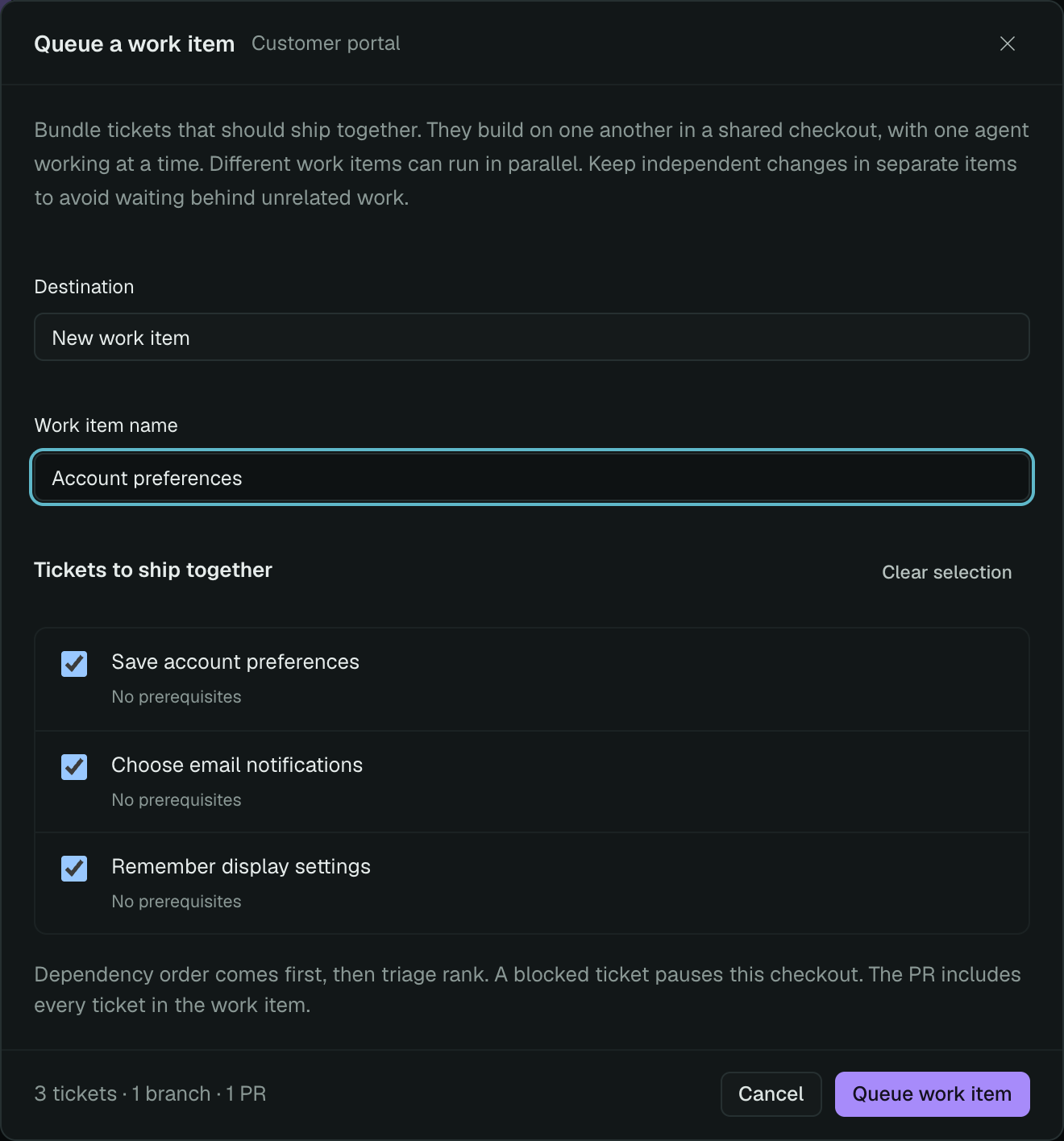
Within a work item, tickets run sequentially, respecting dependencies before rank. A prerequisite’s verified commit must be present in the shared checkout. Between work items, a prerequisite must be Done and its landed code present on the base branch. Moving a card alone does not merge code.
Cross-item conflict links hold work until the conflicting branch lands. Within the same item, the single-writer rule lets later tickets build on earlier changes without an intermediate merge.
If automatic queueing is on, eligible fresh ranked tickets in a queueing pass are bundled together. Turn it off when you want to choose the groups yourself; see automation.
Starting from an empty project
Section titled “Starting from an empty project”Make the scaffold the first ticket: app structure, build configuration, and initial dependencies. Link the features that need it as dependents, and bundle the scaffold with the related features. The scaffold runs first; later tickets use its committed code directly in the shared checkout. One PR covers the complete feature. Use the optional combined check or approve a version you have checked yourself.
Keep independent features in separate items when they should ship separately. Rank alone does not create a dependency. Existing independent branches still need their prerequisites merged first.
Keeping the order yours
Section titled “Keeping the order yours”Moving a ticket up or down in its drawer pins it, and later passes leave pinned tickets alone. Unlinking a dependency is one click when the ticket is idle. You cannot delete a prerequisite while unfinished tickets depend on it; archive completed work or update those links first. Editing a ticket’s title or description after triage marks its result stale, so you know the placement was made against older text.
Deal with the flags: Clarify and Split turn an unclear or oversized ticket into one an agent can finish. Or hand the queue over in Automation.