
Open and merge a pull request
A work item ships one shared branch containing all its tickets. You can open one PR on GitHub, or merge locally into the work item’s saved target branch.
Opening one
Section titled “Opening one”Wait for every member to finish, then use Create one PR on the work-item panel above the board. The ticket drawer also offers Create work item PR. Both act on the whole bundle.
The confirmation shows From (checkout, branch and commit), To (repository and base branch), and the steps Herdloom will take. That preview is checked again when you submit. If the code, checkout, destination or shipping settings have changed, use Refresh preview and inspect the new version before confirming.
Choose I’ve checked this myself to ship the reviewed version immediately, or Run the combined check first to run configured tests/build and an AI review. A current passing result is reused; manual approval is recorded separately and leaves any failed findings visible.
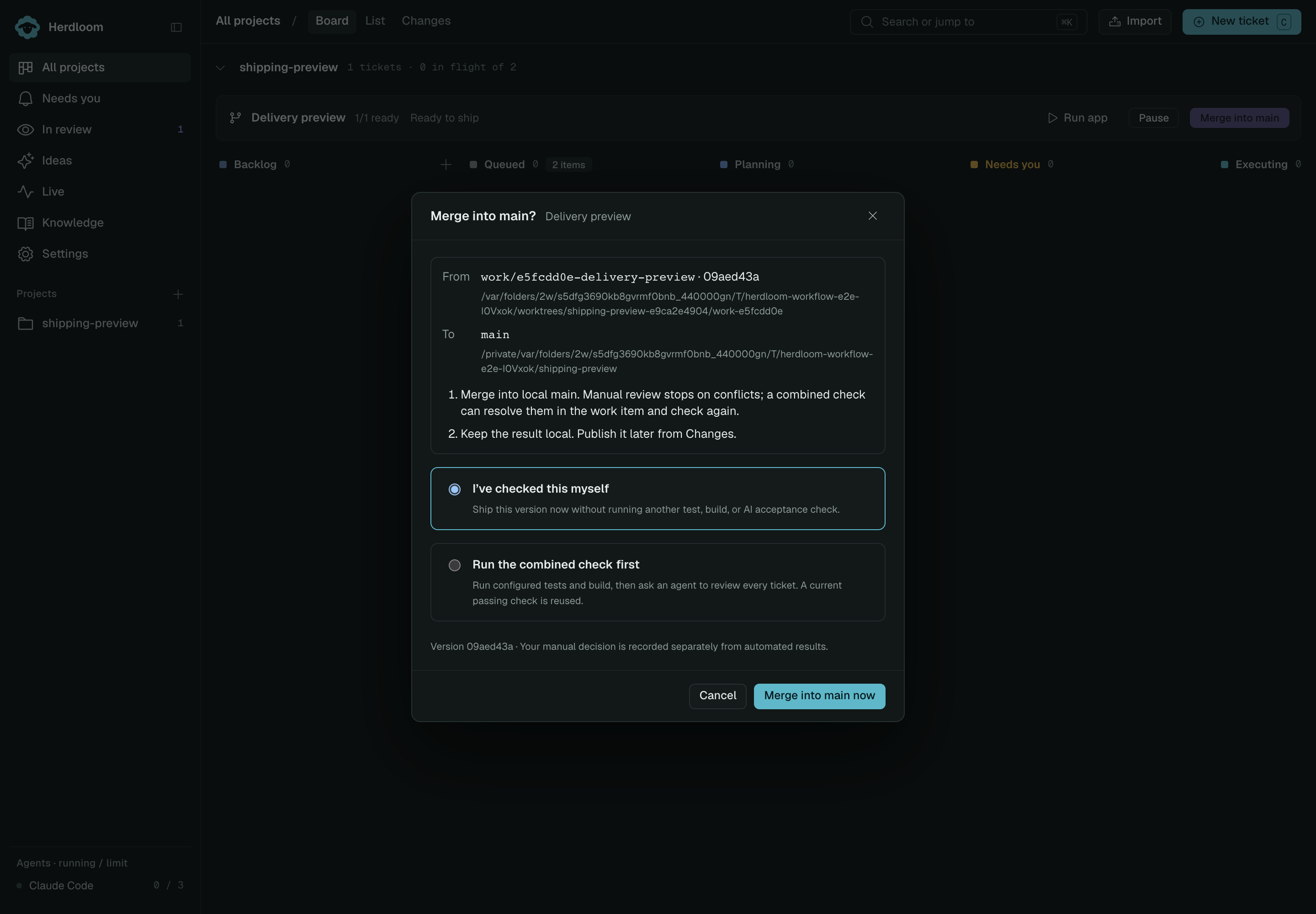
Creating the PR pushes the shared branch and lists its tickets together. They move to In PR as a group. Update PR uses the same approval choice and pushes later changes to the same PR.
Merge into main (or the item’s saved target branch) merges the whole work item into the main checkout. Use the header branch button to switch to the saved target first. Changing a project’s target for new work does not retarget existing PRs or work items. It first brings in newer remote base commits, preserving local work. All member tickets move to Done together. Use Changes to publish local base commits unless Push after merging is enabled. A local merge can still be refused by conflicts or uncommitted work.
The GitHub CLI must be installed and signed in to create PRs. The setup check reports its status. Existing branches are adopted into work items and use these same controls.
What the merge button tells you
Section titled “What the merge button tells you”A ticket in In PR has a Merge PR button in the drawer. Branch protection is honoured rather than fought: when a rule stands in the way, the button says which one instead of failing.
- A required review that has not been given.
- Checks that are failing, or still running.
- A pull request still marked draft.
- A conflict with the base branch.
Merging uses the first method the repository and its ruleset allow, so a repository that only permits squash merges gets a squash. An administrator on a repository whose rules allow bypass gets a separate Merge as admin action, kept apart from the ordinary one on purpose.
Merge refuses while any member of the work item is still active or not ready.
After it opens
Section titled “After it opens”Herdloom checks open pull requests on startup and every minute. The drawer shows when GitHub was checked, which commit its CI results describe, and whether the PR matches the local branch. If GitHub cannot be reached, the drawer offers Refresh GitHub instead of showing old checks as a current approval. Different local and remote heads require updating the work item PR first.
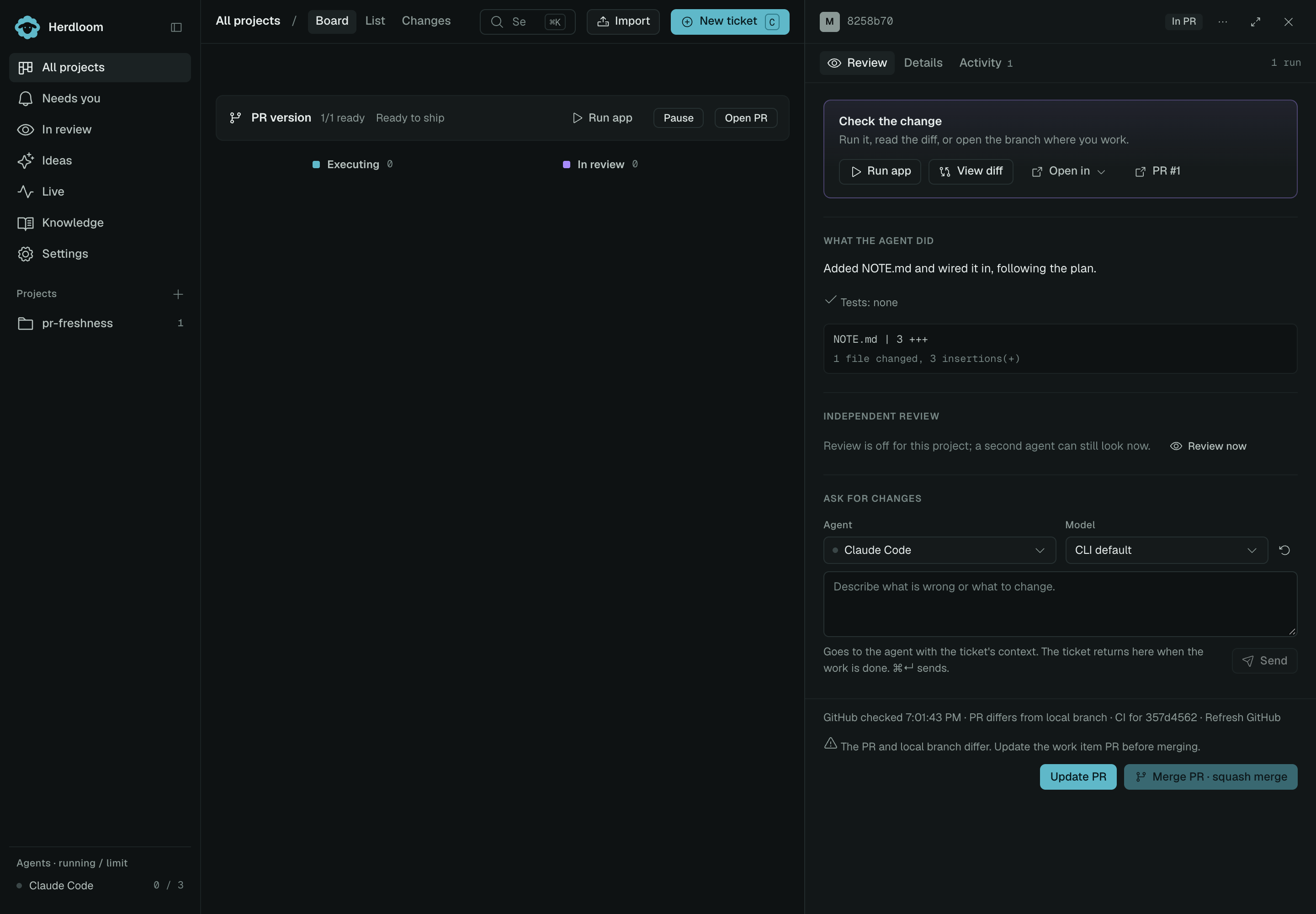
Captured from the real frontend with an isolated GitHub CLI fixture at 2× resolution.
A shared PR that merges, whether from the drawer or GitHub, moves all its tickets to Done. Closing it without merging returns the members to In review and preserves the branch. A queued merge stays In PR until GitHub confirms it completed.
After a confirmed merge, Herdloom updates the local base checkout if a clean fast-forward is possible. Otherwise Sync needed opens Changes with the recovery steps. GitHub completion and local checkout status remain separate so uncommitted work is preserved.
One that GitHub reports as conflicting on two consecutive checks parks the ticket in Needs you with an Update branch action. That merges the current base branch into the work item’s branch, hands the merge to an agent if it conflicts, and pushes the result. The card shows the agent at work while it happens.
For related new tickets, sharing a work item avoids repeated merges between their branches. Separate work items can still conflict with each other or with changes on the base branch.
Letting the project merge
Section titled “Letting the project merge”The In PR row in Automation has one rule: merge when checks pass. It fires only when checks are green, nothing is pending and no branch protection stands in the way. A refusal waits fifteen minutes before asking GitHub again.
Work items covers selection, pause/resume, and combined checking. Integrations is where a Jira issue can follow the pull request through In Review and Done.