
Integrations
A connection is what lets Herdloom read issues from a tracker, and, if you turn it on, write back to them. Settings → Integrations holds one row per connection.
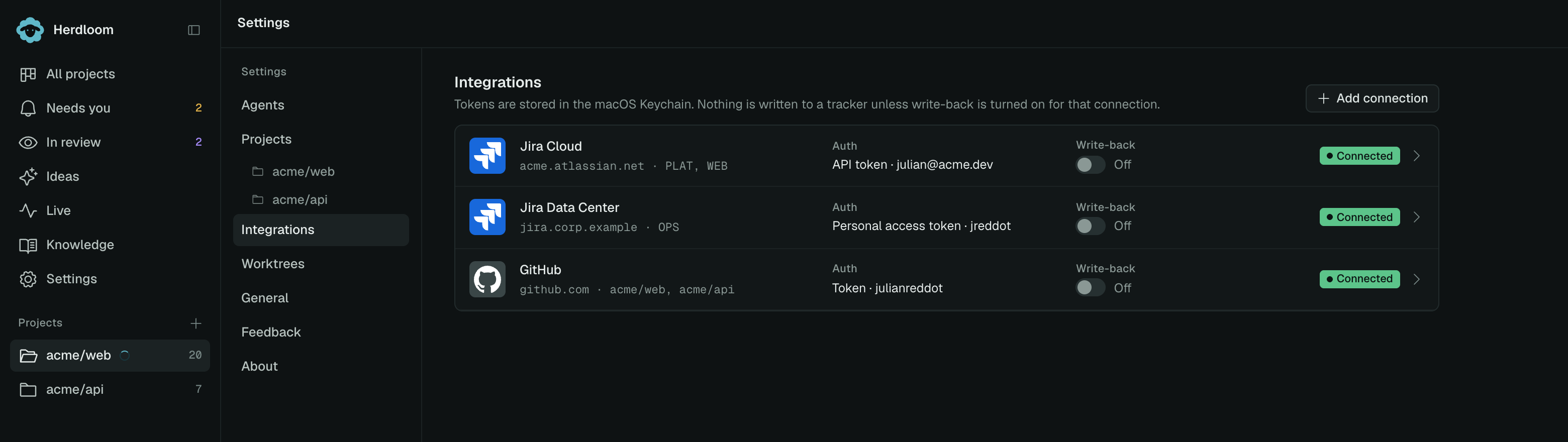
Each row shows the kind, the host, how it authenticates, the write-back switch and whether the last test passed. Clicking a row opens its form.
Adding a connection
Section titled “Adding a connection”Add connection asks for four things.
Kind is Jira Cloud, Jira Data Center or GitHub.
Label is what you will see in pickers. A team key such as PLAT, or the repositories a GitHub
token covers.
Base URL is the host: https://acme.atlassian.net for Jira Cloud, your own server for Data
Center, https://github.com for GitHub.
Email or username, and the token.
- Jira Cloud takes your Atlassian email and an API token, created under id.atlassian.com → Security → API tokens. The two work as a pair.
- Jira Data Center takes a personal access token, created in your Jira profile under Personal Access Tokens.
- GitHub needs no token at all in most cases: without one, Herdloom uses your GitHub CLI login. A token with repo scope is only needed for write-back on repositories that login cannot reach.
Save and test stores the form first, then makes a real call with it, so what you test is what you keep. The row’s chip then reads Connected, Error with the reason, or Not tested.
Tokens are kept in the macOS Keychain. Once stored, the token field shows a placeholder; paste a new one to replace it.
What write-back writes
Section titled “What write-back writes”Import is always read-only. Nothing reaches a tracker until write-back is on for that connection, and then only these things.
On Jira, an issue moves to In Progress when an agent starts on it, to In Review when the pull request opens, and to Done when the ticket lands. Each transition leaves a comment with the link.
On GitHub, an issue gets a comment when an agent starts, an in-progress label, and a comment
with the pull request link. The pull request closes the issue on merge, because its body says
Closes #N.
Turning the switch off stops all of it immediately. The tickets already on the board stay where they are.
Using a connection
Section titled “Using a connection”A connection is not bound to a project by itself. It becomes useful in two places: the import dialog, where you paste issue URLs or a CSV and the matching connection is used to fetch them, and a project’s Integrations section, where a Jira connection plus a query, or a GitHub label, becomes a watch that brings new issues onto the board every minute.
A GitHub issue only imports into the project whose remote is that repository, so the branch and the pull request always land where the issue lives.
Removing a connection
Section titled “Removing a connection”Open the row and choose Remove. The stored token is deleted. Tickets already imported from it stay on the board with their descriptions and their history; they simply no longer refresh, and any watch that used the connection stops.
Import from Jira and Import from GitHub cover bringing issues in. Watch a label keeps the backlog filling itself.