
Project settings
Every project has a settings page of its own. Open it from Settings → Projects, or from the gear on the project’s lane header. The sections are accordions in a fixed order; only the first is open.
At the top sits the repository: its name, its path, Open folder, and Remove, which takes the project off the board and leaves the repository alone. A repository with no remote also offers Publish to GitHub and Link remote.
Automation
Section titled “Automation”One card per column, top to bottom, with its rules beside it.
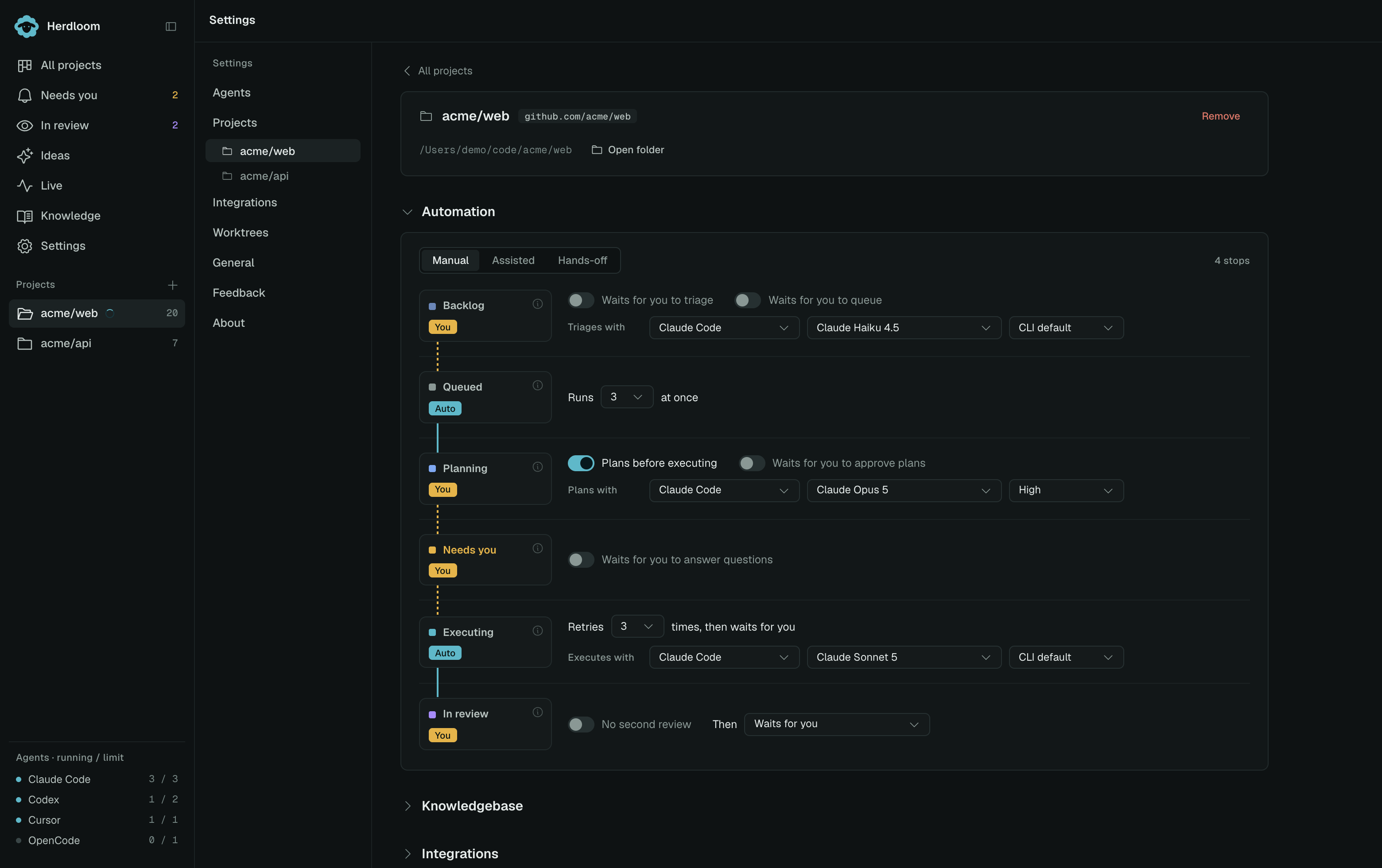
The preset at the top, Manual, Assisted or Hands-off, sets every switch at once; touching any switch turns the label into Custom. Each card carries a chip: Auto when a ticket passes that column on its own, You when it waits for a person. The line between cards goes dashed where a ticket stops, and the count on the right says how many stops there are.
Backlog triages new tickets and queues ranked ones. Queued sets how many tickets the project runs at once. Planning decides whether a plan is written before executing, and whether plans that ask nothing are approved for you. Needs you can answer open questions itself. Executing sets how many retries happen before a failure waits for you. In review turns the second agent on, sets how many fix rounds it gets, and says what happens after a pass: wait, open a pull request, or merge.
Four rows also pick who does the work: the agent, model and reasoning effort for triage, for plans, for the code and for the review. They are independent, so a strong model can plan and a cheaper one can build. Every ticket may override the planner and the executor.
Knowledgebase
Section titled “Knowledgebase”The knowledgebases this project consults, each with the agent and model that read them and whether what a finished ticket teaches is written back directly or proposed for review. Create knowledgebase and Link existing add one. See Knowledge.
Integrations
Section titled “Integrations”Where tickets arrive from. Watch GitHub issues brings open issues carrying the project’s label onto the board within a minute; the label field sets which one. Watch Jira issues does the same for a Jira connection and a query. Check now does not wait for the minute. Nothing is written to an issue until an agent starts on it.
Branches
Section titled “Branches”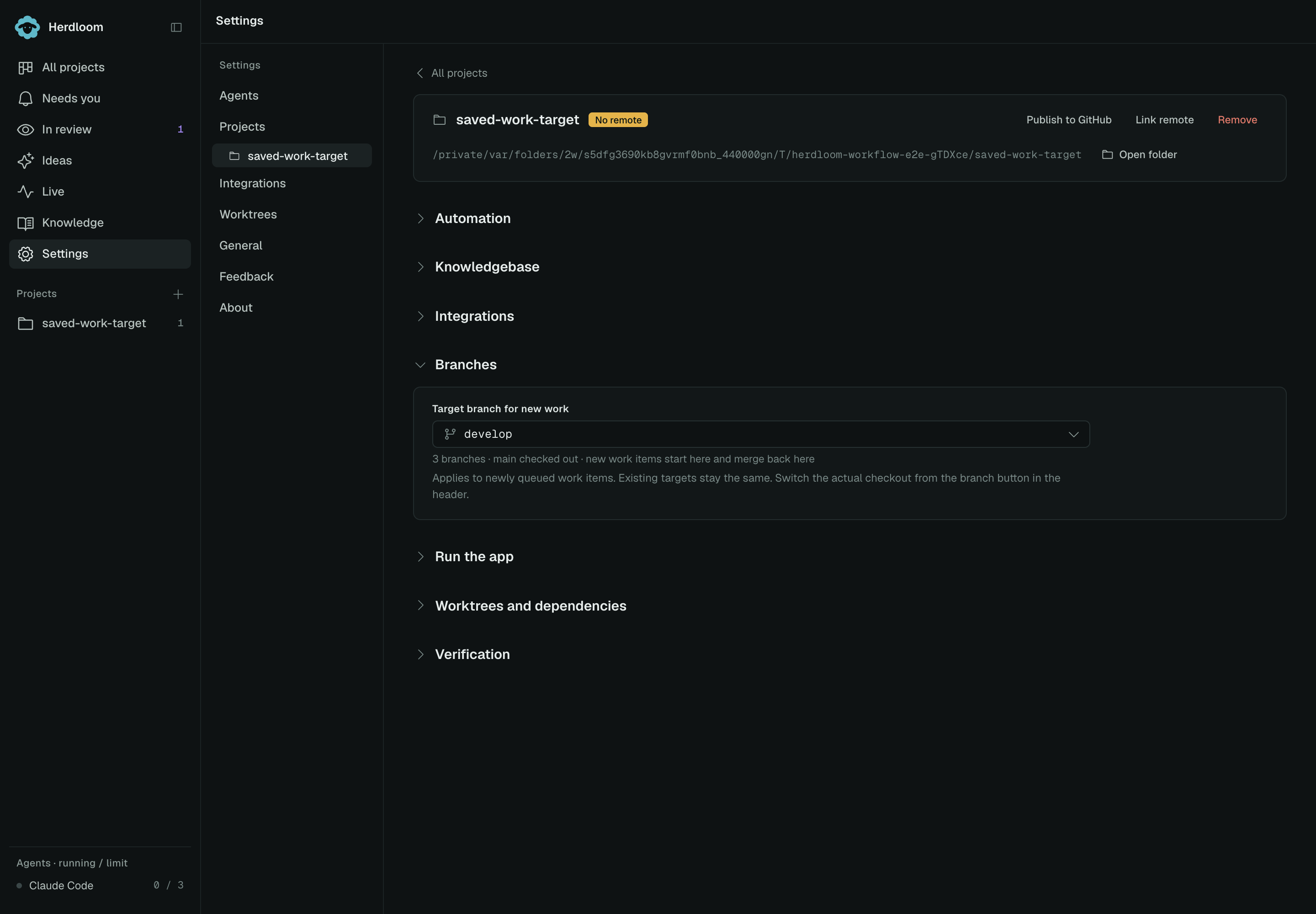
Target branch for new work is where newly queued work items start and where their code lands.
It does not have to be main. Each item saves this target when queued; changing this setting does
not retarget existing work or switch the local checkout. To change which files you are viewing,
use Switch branch in the project header.
Work-item branches use work/<id>-<name>. With a remote, Push target branch after merging
publishes the item’s saved target once a merge lands. Agents still cannot push it themselves.
Run the app
Section titled “Run the app”The list of things the Play button can start, each with its folder and how its port is passed. Detect reads package scripts, workspaces, Nx projects and a bare index file. Detect with an agent also reads READMEs, Makefiles and Dockerfiles, for repositories that start some other way. Add a command writes one by hand. See Run the app.
Worktrees and dependencies
Section titled “Worktrees and dependencies”Setup script runs in every new worktree; left empty it is inferred from the lockfile. Copy
secret files into worktrees is off by default for new projects; enable it when the app needs local
files such as .env to start. Extra files to copy names anything else. Stop active project runs
before changing either copying setting. Worktrees on disk caps how many checkouts this project
keeps; clean, inactive ones beyond the cap are removed and the branch keeps the work.
Verification
Section titled “Verification”Test command runs after every execute attempt. It is what makes a ticket’s “done” mean something. Build command is optional. Both commands run when you choose the combined work-item check.
Changes lets you push locally merged work together instead of automatically after every merge, and optionally commit selected extra source edits.
Automation explains the ladder in full, and Agents covers what each agent may do on any project.