
Teach it your repository
An agent that starts every ticket from nothing rediscovers your conventions every time, and guesses at decisions somebody already made. A knowledgebase is where that knowledge lives between tickets.
What a knowledgebase is
Section titled “What a knowledgebase is”A folder of Markdown a project points at: a wiki, an Obsidian vault, the notes a product team keeps. Agents use its relevant findings as they shape, plan and build, and write back what they learned once the work has landed. Findings can be passed between those steps so each agent does not have to repeat the same research.
It is a git repository, so several people and several machines can feed the same one. One base can serve several projects, and one project can point at several bases. The Knowledge page in the sidebar lists them.
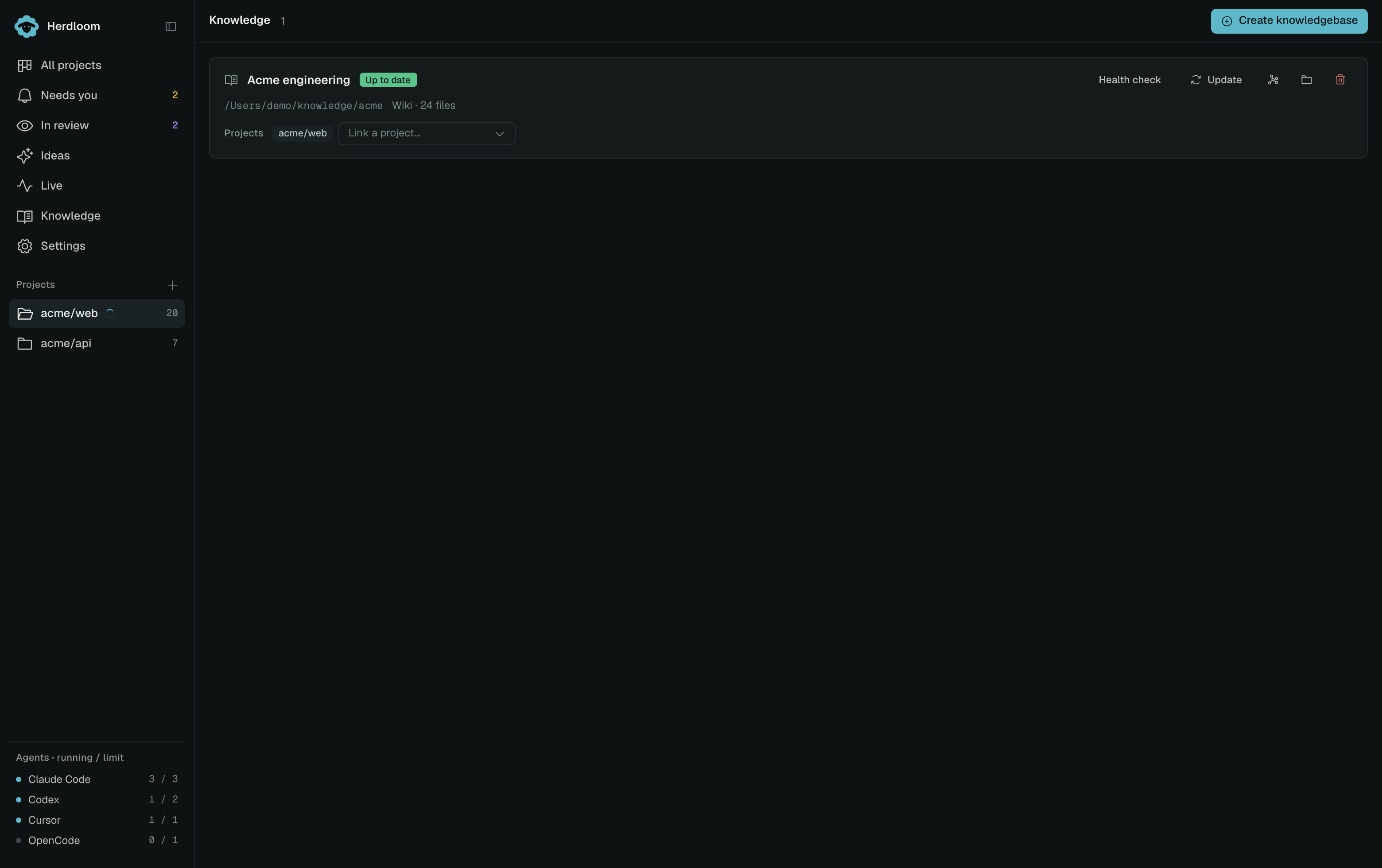
Each card carries one status and the one button that answers it: Up to date, N new files with Update, Needs update, N issues with Fix issues, Learning stopped with Resume, Updating while a pass runs, or Empty. The sidebar shows an amber count when a base needs a person. Under the name sit the folder, the file count, a link to the history of recent passes, and which projects consult it.
The four ways to start one
Section titled “The four ways to start one”Create knowledgebase starts with the source. The remaining fields explain which project is read and where the documentation lives.
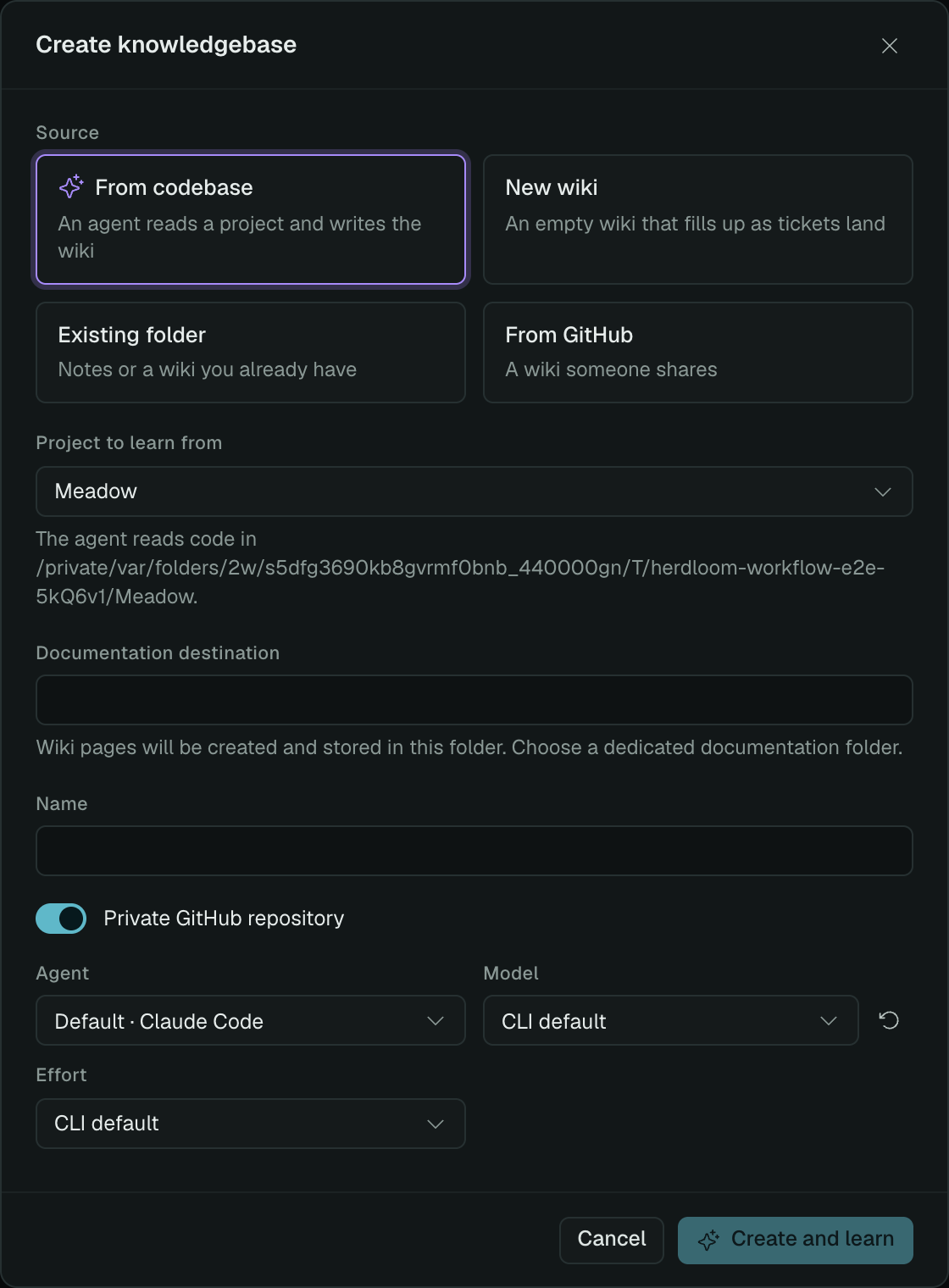
From codebase. Choose Project to learn from first: this is the code the agent reads. Documentation destination is the separate folder where it writes the wiki. Pick the agent, model and effort, and the card turns violet with the pass running on it: reading the repository, writing the area pages, then the patterns, concepts and index, with the agent’s current action and the elapsed time underneath. Stop keeps everything written so far and leaves the base as Learning stopped; Resume picks up where it left off rather than starting again.
New wiki. Choose the documentation destination and a project to link. This creates an empty wiki that fills up as tickets land. Nothing is consulted while a base is empty, so it costs nothing until the first ticket lands, and that first ticket is the first entry.
Existing folder. Choose Existing documentation folder for notes or a wiki you already have, then link a project. Your files stay exactly where they are and are declared immutable sources: agents read them and never rewrite them. The wiki is seeded beside them. A folder that already is a wiki is left alone.
From GitHub. Enter the wiki’s Repository URL and link a project. Herdloom keeps a local clone in its managed knowledge folder and synchronizes it with the remote.
Unless you switch it off, a new base gets a private GitHub repository through the sign-in you already use, and its first commit is pushed.
What a ticket gets
Section titled “What a ticket gets”Relevant findings travel with your ticket. When you accept a proposal in Ideas, its knowledgebase findings and page references can follow each ticket into planning and execution. A planner can add what it learns during its own run, without waiting for a separate consultation first.
In the ticket drawer, open Details → Knowledge to see From Ideas, From planning, or Brief, along with the saved findings and citations. Herdloom reuses them while the ticket and referenced pages remain unchanged. It checks this locally, avoiding another agent call and a full knowledge map in the execution prompt.
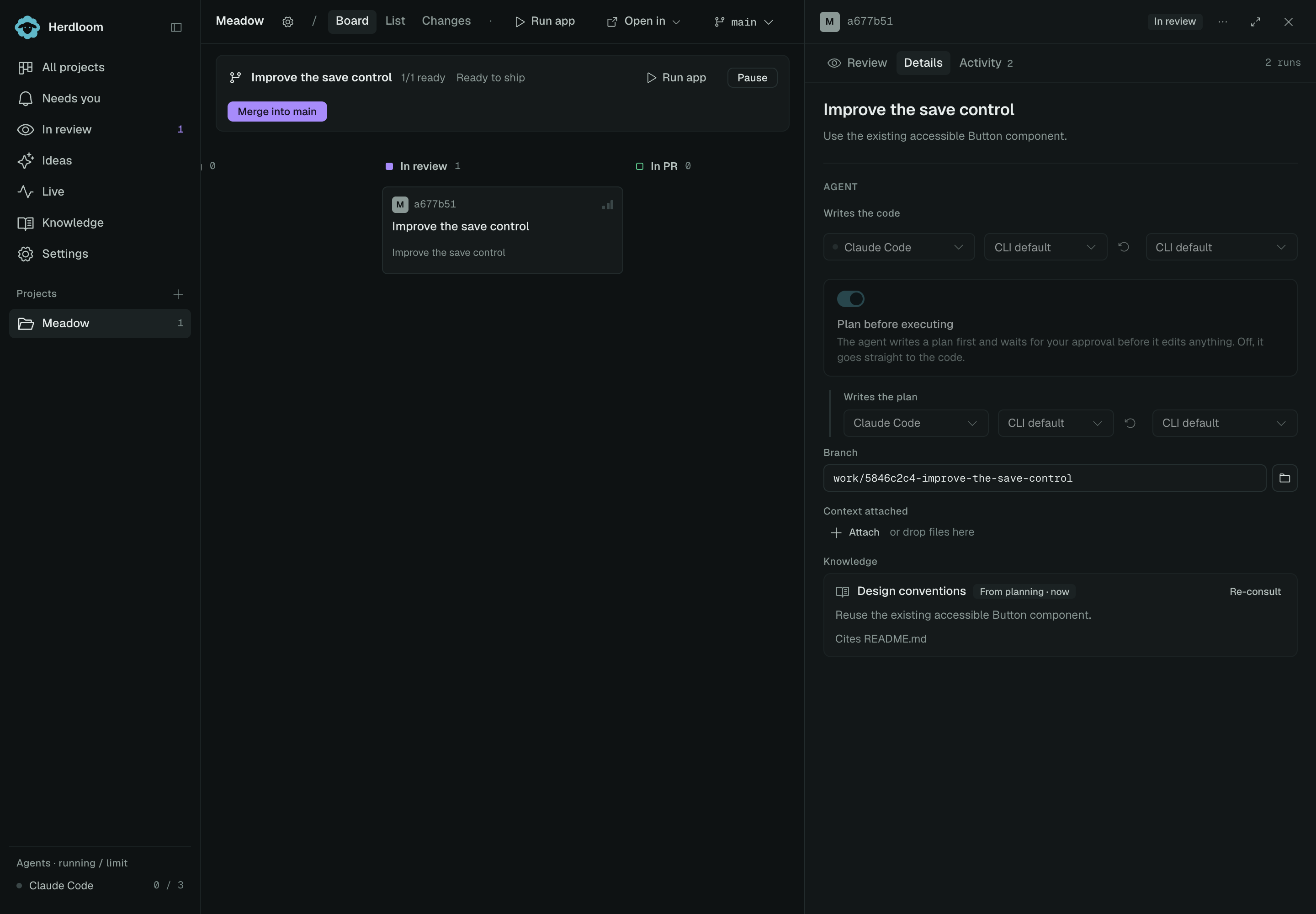
Captured from the current app with an example project. The ticket is In review and its findings remain visible in Details. Click the screenshot to enlarge it.
From idea to implementation
Section titled “From idea to implementation”- Discuss the change in Ideas with a project knowledgebase linked. Accept the proposal.
- Open the ticket’s Details → Knowledge. Findings recorded for it show From Ideas, with citations.
- If planning is on, the planner uses those findings and can add its own. Added findings show From planning; unchanged Ideas findings keep their original label.
- Execution receives the approved plan and current findings together. It can also reuse Ideas findings when Plan before executing is off.

The label identifies where the findings came from. It is not an extra agent run.
When does it consult again?
Section titled “When does it consult again?”| Situation | What happens |
|---|---|
| Current findings already exist | Reuse them; no separate consultation before execution. |
| The planner needs more context | It can read the relevant pages during planning and save its findings. |
| No reusable findings are available | A source configured to provide a brief can need a consultation before execution. |
| Requirements, references, source rules or relevant pages changed | Refresh the affected source instead of reusing outdated findings. |
| Only an unrelated page changed | Cited findings can still be reused. Findings without citations need a broader freshness check. |
| You choose Re-consult | Request a fresh consultation for that source. |
Knowledgebase synchronization continues separately; freshness checks use the pages available locally. A source removed from the project is no longer supplied to new runs.
Reusing findings avoids a separate research step; it does not prevent an agent from checking the code or reading a specific page when a new question comes up. An approved plan alone does not guarantee that reusable knowledge findings exist.
How pages get written back
Section titled “How pages get written back”Every ticket that lands is written into the base as a source and ingested following the base’s own rules: the pages it touches are updated, the index gets its line, the log gets its entry. A file you drop into the folder yourself is ingested a few seconds later without pressing anything, and a push from somebody else is pulled in and ingested the same way.
The project’s Knowledgebase section decides how that lands.
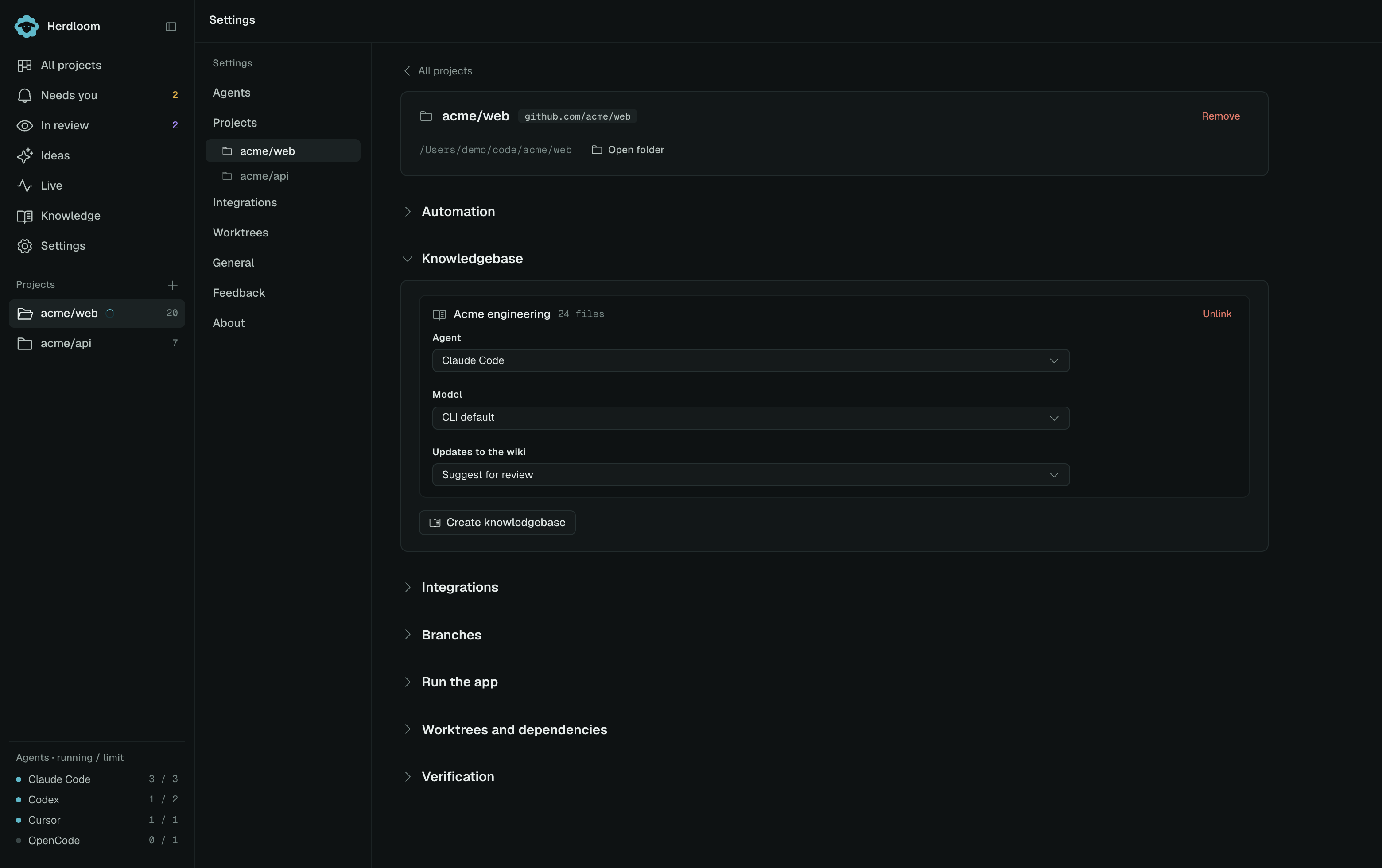
Per base, it sets the agent and model that consult and write, and Updates to the wiki: Apply directly, which commits, or Suggest for review, which opens a branch and a pull request for whoever owns the base. Every landed ticket teaches the wiki; the only choice is how the change arrives.
The health check
Section titled “The health check”A wiki that only ever grows drifts. Health check reads the whole base, then fixes what the sources settle: contradictions, pages nothing links to, claims the code has moved past. It follows the base’s own rules and leaves open only what a person has to decide, such as two sources that disagree with neither newer. It runs on its own after every ingest, and on demand from its button. Its changes land through the same Apply or Suggest setting.
Stop on the card cancels an active health check or update. Pages already written and the last report stay available. When a card says N need you · View issues, open it to read the unresolved questions, enter your decision and choose Apply decision and check. Running the check again cannot settle a decision only you can make.
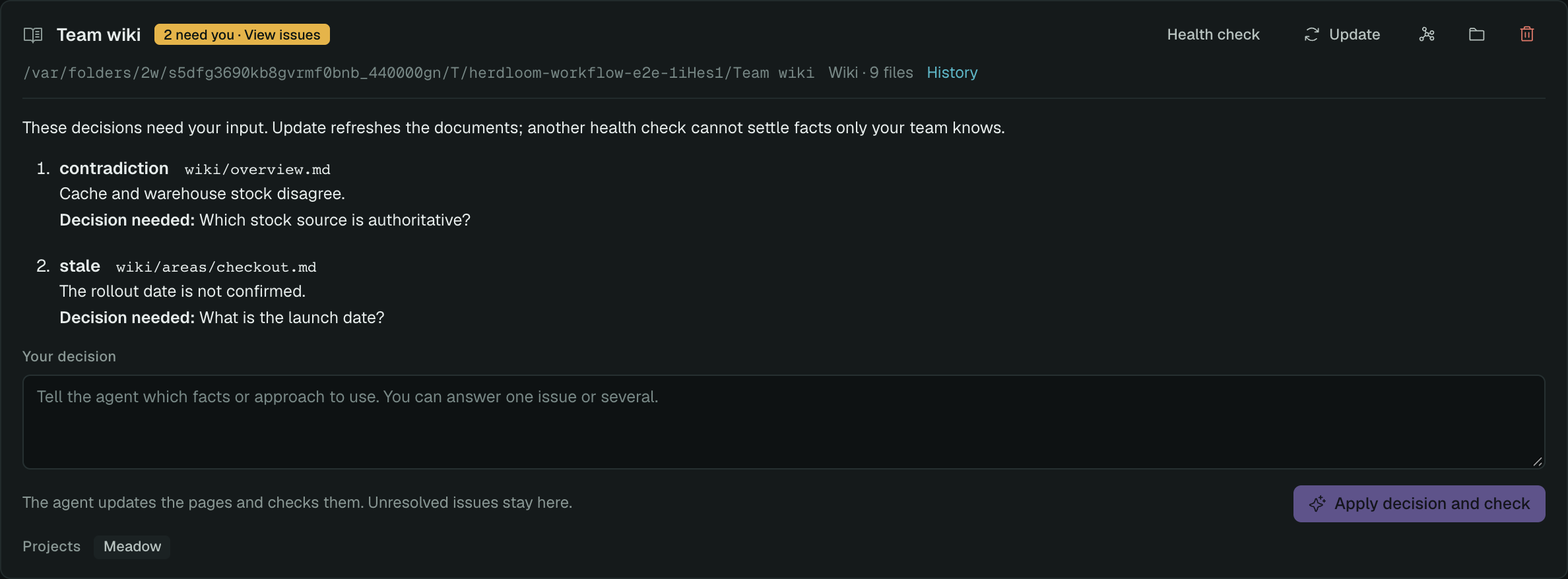
An example report in the current app. The questions remain visible until a decision resolves them.
The page graph
Section titled “The page graph”The graph button on a card draws the base the way Obsidian draws a vault.
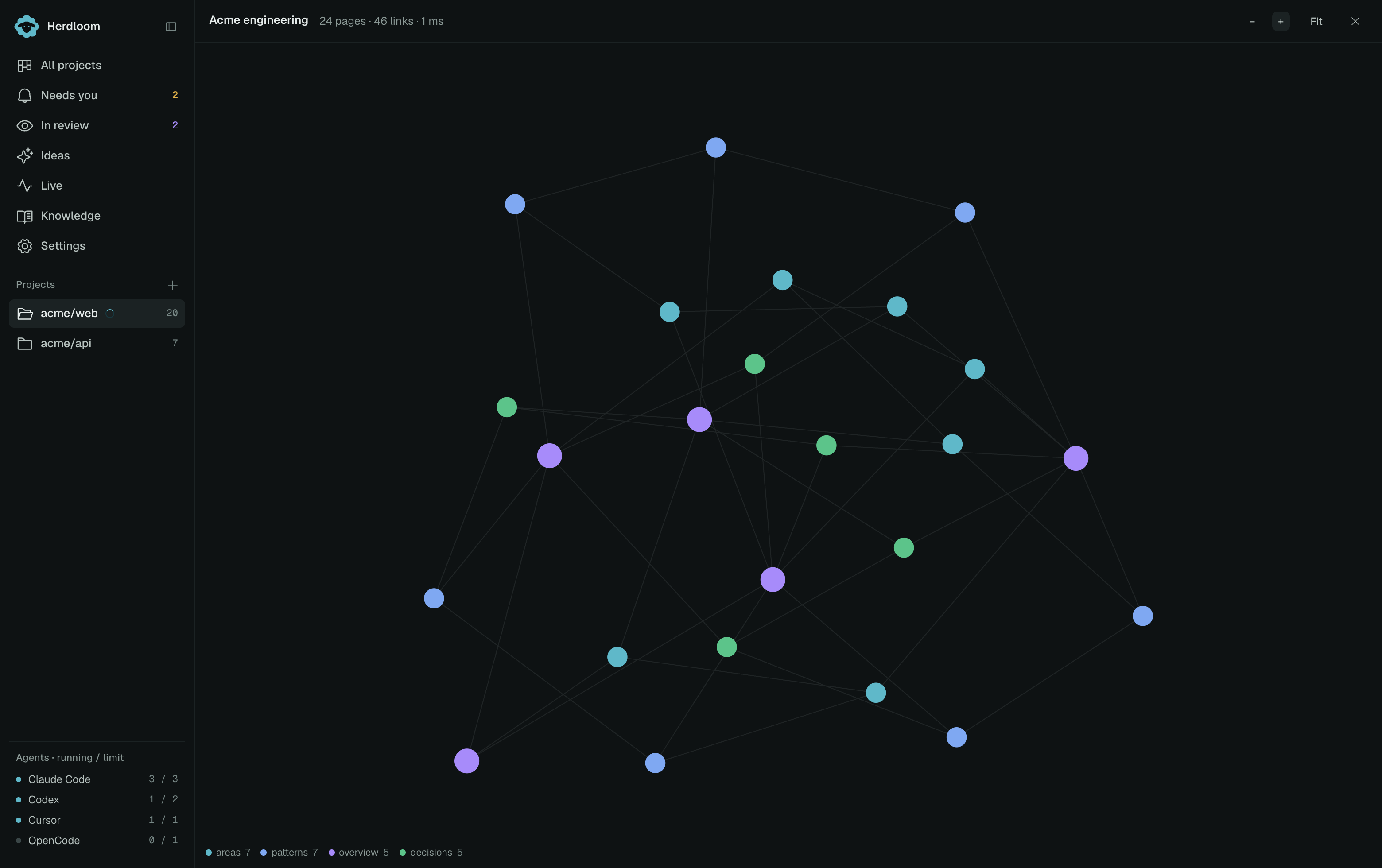
Every page is a node, every link an edge, coloured by top-level folder. Pan and zoom, hover for a title, click a node to read the page and see what links to it and what it links to.
Write a ticket — a brief only helps a ticket that says what it wants. Projects holds the per-project Knowledgebase section.