
Tickets
A ticket is the unit of work agents plan, build, and review. Open one from the board and it fills a drawer beside the columns. Before the tickets exist, you can shape the work in Ideas.
What a ticket carries
Section titled “What a ticket carries”Title and description. The description is Markdown, and it renders tables, block quotes and bare links. Acceptance criteria belong here, as a list: they are what the reviewer checks the branch against, so anything not written down is not checked.
Priority and labels. Both show on the card. Imported tickets keep the priority and labels they had in the tracker.
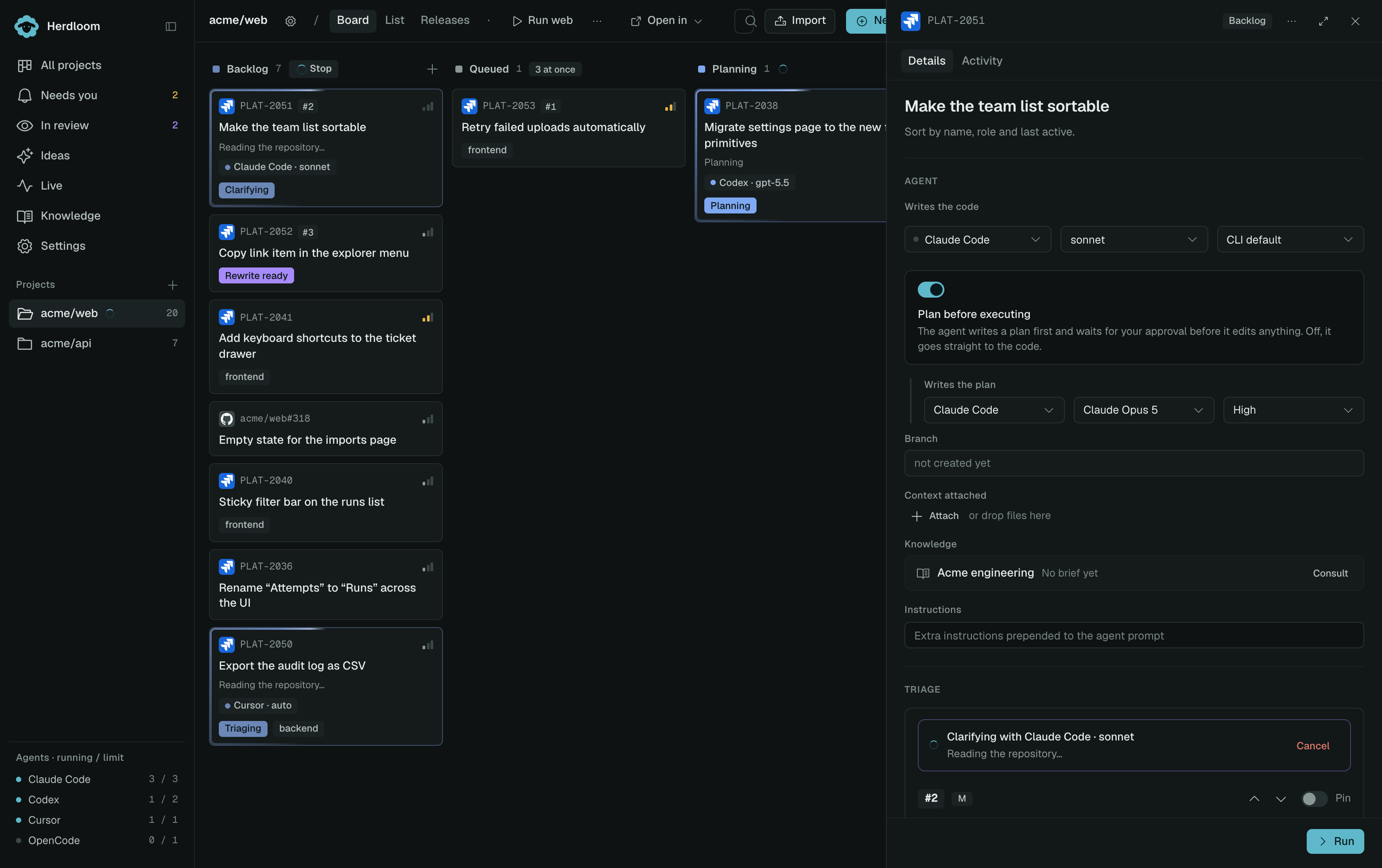
Who writes the plan and who writes the code. Two rows, named by what comes out of them. Each row picks an agent, a model and a reasoning effort, and the two can be different tools. Between them sits the plan-before-executing switch; turn it off and the run goes straight to the code.
Its work item and branch. Related tickets share their work item’s branch and checkout. Each keeps its own instructions, plan, and run history. Existing branches are adopted into work items without changing their names or commits. Work items explains how to choose a bundle before queueing.
Attached context. Drop a PRD, a spec, a screenshot or a design onto the ticket and it rides along into the agent’s prompt. Text is read inline; images are opened from their path.
Extra instructions. A short note prepended to the agent’s prompt, for a convention or a warning that is not part of the ticket itself. The reviewer reads it as context, not as scope.
Its knowledge brief. Relevant findings and page references can travel from Ideas into the ticket. The planner can add findings during its own run. Open Details → Knowledge to see where they came from: From Ideas, From planning, or Brief. Execution reuses current findings instead of paying for another consultation. Changed requirements or relevant pages can require a fresh pass; Re-consult requests one explicitly. Knowledge explains when findings are reused.
A ticket in the backlog
Section titled “A ticket in the backlog”A backlog ticket has no run yet, so the drawer shows what it would run with and what triage made of it: a rank, a one-line rationale, arrows to move it up or down, a pin to hold its place, and any flag triage raised. A “Needs detail” flag carries a Clarify button; a “Too big” flag carries Split.
Where tickets come from
Section titled “Where tickets come from”Ideas. Discuss the work with a coding agent and accept its latest proposal. Each proposed ticket becomes a backlog card with its description, acceptance criteria, dependencies, and the context files sent in that conversation, plus any valid knowledge findings recorded for that ticket. Start with an idea walks through the process.
Typed. New ticket opens as a full page: title, description, context, which project it goes to, priority, and the two agent rows prefilled from the project’s automation. Collapse it to a dialog if you prefer, and it stays that way. New tickets always land in Backlog.
Imported. Jira Cloud, Jira Data Center, GitHub Issues, or a CSV of issue URLs. Import is always read-only, and previews every row before anything is created. A GitHub issue only imports into the project whose remote is that repository, so the branch and the pull request land where the issue lives.
Watched. A project can watch its GitHub repository for issues carrying a label, or a Jira connection for a query. Matching issues become backlog tickets every minute. Labelling an issue is then the whole workflow.
Write a ticket worth running covers what makes the difference between a ticket an agent finishes and one it guesses at. Clarify and split fixes the ones that are not there yet.