
Agents
Settings → Agents is the page that says whether this Mac can run anything, and what each agent is allowed to do when it does. It is the same check that runs on first launch, kept live.
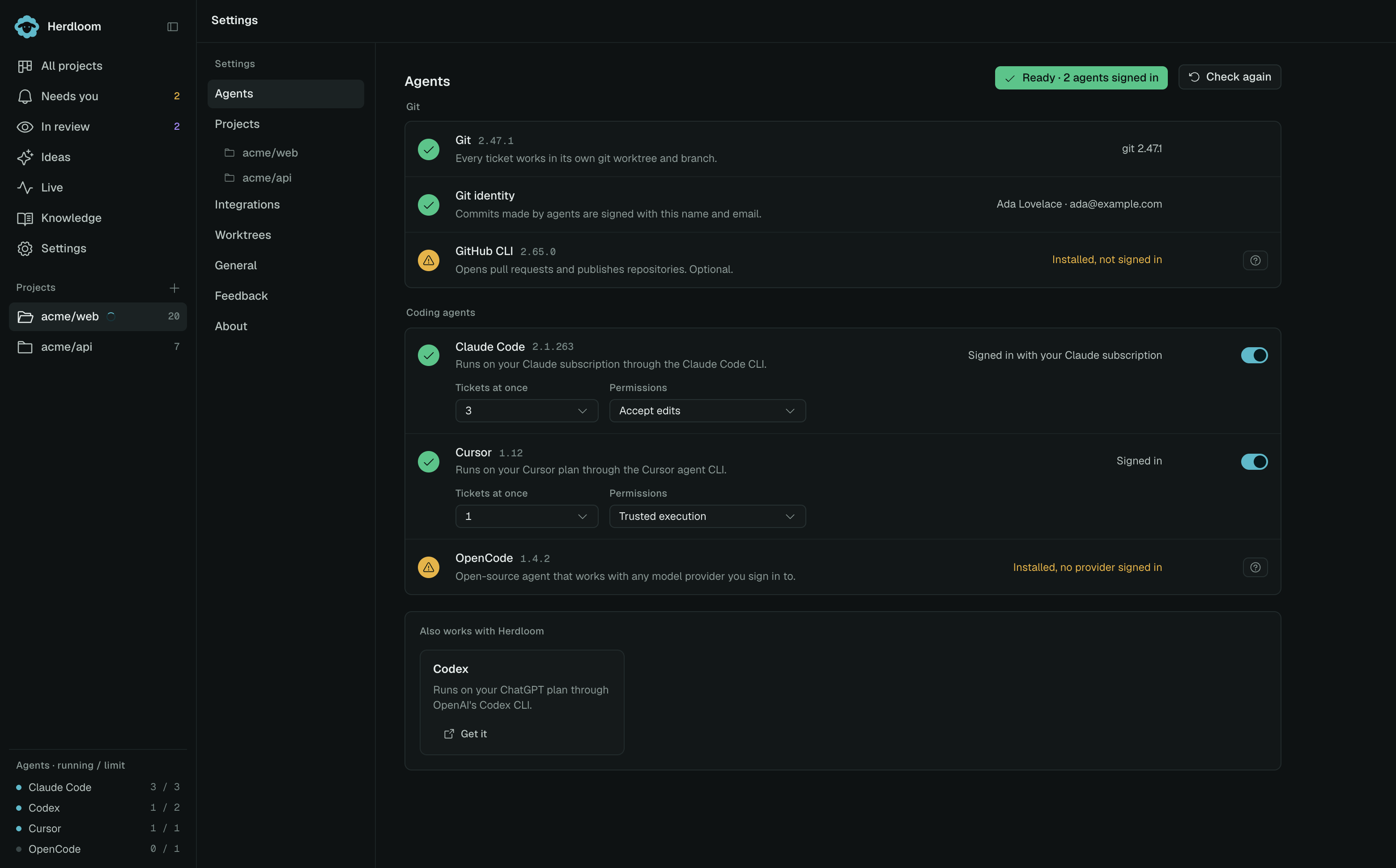
A green verdict at the top right counts the agents that are signed in. Check again re-runs every row, which is how a newly installed CLI moves up into the list.
The three rows at the top
Section titled “The three rows at the top”Git shows the version found. Each work item uses a separate git worktree and branch, so nothing else on the page matters until this row is green.
Git identity is the name and email that commits made by agents are signed with. Change edits it in place.
GitHub CLI shows the version and the account it is signed in as. It opens pull requests and publishes repositories. It is optional: without it, tickets still run, merge and land locally.
Git and the GitHub CLI install from this page with one click, and the output streams into the row.
The agent rows
Section titled “The agent rows”Below them sits one row per coding agent found on the Mac: the name, the version, one line saying what it runs on, and the account or plan it is signed in with. The switch on the right decides whether Herdloom may use it at all.
Agents are not installed from here. A CLI that is not on the machine appears in Also works with Herdloom at the bottom, one tile each with a link to get it. Sign-in also happens outside the app: every CLI owns a browser login that does not survive being driven from another process. The help button on a signed-out row gives you the exact command to run in Terminal.
Each signed-in row carries two controls.
Tickets at once is how many tickets that agent works on simultaneously, counted across every project, from 1 to 8. It is the ceiling for the agent itself; a project’s own limit, under Automation, applies on top of it. The sidebar footer shows each agent’s running count against this number.
Permissions is what the agent may do inside a worktree without stopping to ask.
What each permission mode means
Section titled “What each permission mode means”The plan phase is read-only whatever this is set to, and no mode lets an agent push the base branch.
| Agent | Mode | What it means |
|---|---|---|
| Claude Code | Accept edits | Edits files in its worktree without asking. Any other tool it has not been allowed becomes a permission request that waits in Needs you. |
| Claude Code | Bypass permissions | Runs its tools without asking. Faster, and nothing stops to wait for you. |
| Codex | Workspace write | Writes inside the worktree it was given. |
| Codex | Full access | Runs without that boundary. |
| Cursor | Force | Edits and commands are applied. |
| Cursor | Propose | Changes are proposed rather than applied, so an execute run is unlikely to leave commits on the branch. |
| OpenCode | Ask | Stops for approval on tools it has not been given. |
| OpenCode | Auto | Runs them. |
| Antigravity | Edits only, no commands | Files change; shell commands do not run. |
| Antigravity | Skip permissions | Both run without asking. |
| GitHub Copilot | Tools only | Its own tools, nothing more. |
| GitHub Copilot | Allow all | Everything it can reach. |
Project settings decides which agent does what on a given repository. Agents explains how a run is handed to one.